Vocello JP
Vocello JP 2.4.0 · macOS 26+ · Apple Silicon

Premium voice studio. Proven performance. Private by design.

A voice studio that never leaves your Mac. Write a script, pick a preset or describe a voice, and generate speech locally on Apple Silicon. Ten languages and responsive native generation after a one-time model download.

Ad-hoc signed community build · MIT app code · Swift + MLX

Also on iPhone: join the public beta on TestFlight

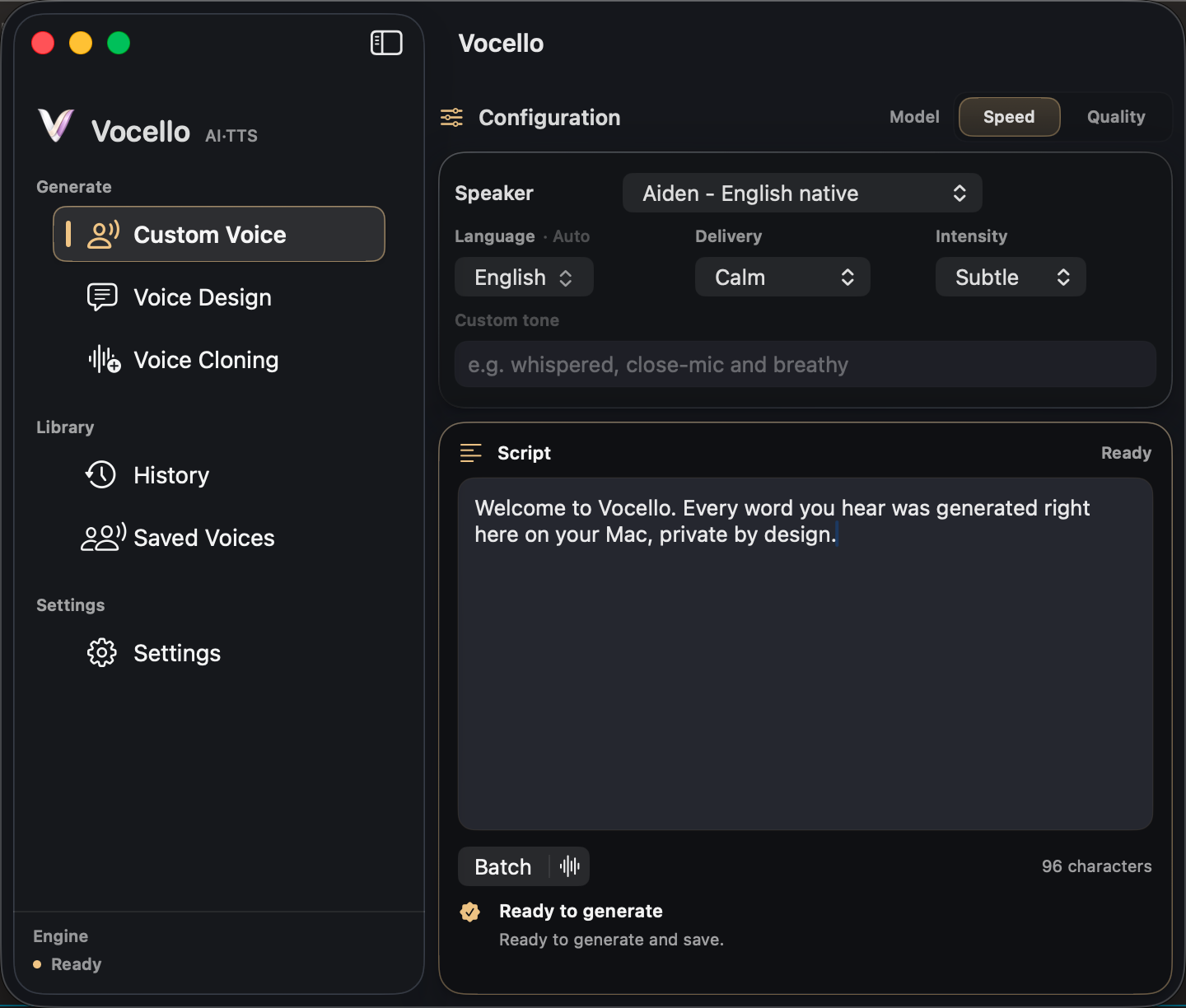
Vocello Built-in Voice screen showing speaker, delivery, model, and script controls
Vocello Built-in Voice screen

01 · Selected speaker presets

Pick a voice. Set the delivery. Generate.

Choose one of nine built-in Qwen3-TTS CustomVoice speaker presets, set the delivery, and turn a script into a clean spoken line. The simplest path when you want a consistent voice right away.

  1. 01

    Nine built-in speaker presets

    English, Chinese, Japanese, and Korean native presets, each tuned to its language.

  2. 02

    Delivery presets

    Eight delivery presets: four distinct deliveries (Neutral, Calm, Whisper, Sad) that come through reliably, and four directional hints (Happy, Sad-adjacent Fearful, Angry, Surprised) that shape energy and pace.

  3. 03

    Custom tone field

    Describe the delivery in your own words when the chips aren't enough.

Vocello Voice Design screen

02 · Describe a new voice

Describe the voice in plain language.

Write a voice brief, "a warm, deep narrator with a subtle British accent," and Vocello shapes a fresh voice around it. No model wrangling, no presets to memorize.

  1. 01

    Voice brief

    One tight sentence describing timbre, accent, or delivery style.

  2. 02

    Save what works

    Keep designed voices in Saved Voices and re-use them in any future script.

  3. 03

    Local generation

    The brief never leaves your Mac. Designed voices live in app storage.

Vocello Voice Cloning screen

03 · From a saved voice or reference clip

Clone from a clip you own.

Pick a voice you already designed in Saved Voices, record a short reference clip with the microphone, or import an audio file. Transcript-backed saved voices can reuse prepared Qwen3 clone prompts for cleaner repeat generations. Only clone voices you have permission to use.

  1. 01

    Saved, recorded, or imported

    Pick any voice from Saved Voices, record a clip in the app, or import a reference file on either platform. The Mac open panel accepts WAV, MP3, AIFF, M4A, FLAC, OGG, or WebM; the iPhone Files picker accepts WAV, MP3, AIFF, or M4A. Saved Voices are optimized for repeat use.

  2. 02

    Transcript-backed quality

    Paste the words spoken in the clip, or let Vocello transcribe them locally, for the strongest reusable clone prompt. Audio-only references remain available as a lower-guidance fallback.

  3. 03

    Source-led delivery

    Voice Cloning follows the reference clip. Delivery presets are not exposed for this path today.

Listen first

Five voices.
Three ways to ask for them.

Each row carries the brief or speaker, the script, the delivery setting that produced it, and a waveform from the local render. The set includes a Japanese take and a 31 second narration. Install Vocello to generate your own.

  • Voice DesignA warm, deep narrator with a subtle British accent.
    The valley opens after the last bend, slow, and quieter than the road would suggest.
    Calm0:08
  • Built-in VoiceAiden, English native
    Hey, welcome back to Field Notes. Today we're walking through the demo build, end to end.
    Excited / Normal0:06
  • Built-in VoiceOno Anna, Japanese native
    音声はすべて、このMacの上で生成されます。台本も声も、どこにもアップロードされません。
    Neutral0:09
  • Voice CloningCloned from a 12-second narration clip
    Every measurement was logged, every observation written down. Only then could the model be trusted.
    Mirrors source clip0:09
  • Built-in VoiceRyan, English native
    Chapter one. The harbor was quiet at that hour, and the water held the last of the light. She walked the length of the pier with her notes in one hand…
    Calm0:31
Delivery presets

Built-in Voice and Voice Design shape a take with one of ten delivery presets, each at normal or strong intensity.

NeutralHappySadAngryFearfulSurprisedWhisperDramaticCalmExcited
The Vocello delivery menu open, listing all ten presets from Neutral to Excited
All ten presets, each with normal and strong intensity, live in the app.

In the studio

Built for long scripts.

Vocello turns long scripts into finished projects, speaks ten languages, and installs models reliably. Everything runs locally on your Mac.

Long scripts become projects
A script past the single-take limit is planned into segments, generated in order while you listen along, and joined into one finished audio file. History keeps the project with a per-segment map, and a single weak segment can be regenerated without redoing the rest.
Ten languages, detected automatically
Chinese, English, Japanese, Korean, German, French, Russian, Portuguese, Spanish, and Italian. Vocello detects the script's language on its own, and a manual language choice is always available.
Downloads that behave
Model installs run three files at a time, retry interrupted transfers automatically, and verify integrity without re-reading multi-gigabyte files. Shared components are stored once across models, saving disk.
Vocello Generation History listing past takes across Built-in Voice, Voice Design, and Voice Cloning
Generation History keeps every take on your Mac, ready to replay, save, or export.

Why not cloud TTS?

Local first, with the setup caveat.

If you arrived looking for an ElevenLabs local alternative for Mac, Vocello's answer is narrower and quieter: your scripts become speech on your own Mac, and nothing you write or generate leaves it.

VocelloCloud TTS services
PriceFree, MIT licensedSubscription or credit packs
Where speech is generatedOn your MacOn the provider's servers
Your scriptStays in local app storageUploaded to generate
MeteringNonePer character or per minute
AccountNoneRequired
Raw English naturalnessStrong; judge the samples aboveThe best cloud voices still lead

Setup is not air-gapped: models download from Hugging Face during setup and updates. After that download, generation runs locally.

How it runs

Vocello runs on your Mac.

The privacy story is not a badge on top. It is how the app is built, how models install, and where generated audio stays.

Vocello Model Downloads screen showing Speed and Quality models ready
Model Downloads keeps Speed and Quality variants visible for each workflow.
Where generation happens
On your Mac
After models download from Hugging Face and install, every line renders locally. No scripts uploaded and no generated audio sent to a cloud TTS service.
Where data lives
Local app storage
Scripts, history, saved voices, and generated audio stay in Vocello's local storage until you export or reveal a file yourself.
Pricing
Free on Mac
The Mac app is free and open-source. Download the Speed or Quality model from Hugging Face once and generate as many lines as your Mac can hold. No subscription, no per-character meter, no queue.
Speed model
4-bit
Smaller package, faster startup, lower memory. Vocello defaults to Speed on 8 GB / floor-spec Macs. Manage in Settings, Model Downloads.
Quality model
8-bit
Larger package, slower to warm up, finer timbre and delivery. Vocello defaults to Quality on Macs with more RAM. Speed and Quality can coexist; pick the active variant on each generation screen.

Vocello for iPhone

The same studio, in your pocket.

The iPhone app runs the same local engine in-process on the phone: Built-in Voice, Voice Design, and Voice Cloning with the memory-conscious Speed model, microphone recording, audio file import, or a saved Voice Design reference for cloning, and local history.

Public TestFlight beta · iPhone 15 Pro or newer · iOS 26

Vocello Studio running on an iPhone, with a script ready to generate with a built-in voice

Measured, not promised

A first-party engine, measured on the minimum Mac.

Vocello is benchmarked on its own support floor, a Mac mini M2 with 8 GB. Speeds are multiples of realtime: past 1.0×, audio generates ahead of playback, and every number here traces to a tracked record in the open repository.

0.5×1.0× · realtime1.5×2.0×Built-in Voiceshort1.66×medium1.94×long2.02×Voice Designshort1.95×medium2.00×long2.13×Voice Cloningshort1.50×medium1.85×long2.02×
Warm generation by mode and script length, take medians. Since 2.2, translucent app surfaces render solid while audio generates, which improved speed on the same take by about a third.
Swift end to end
Generation runs through Vocello's own Swift runtime on MLX, derived from mlx-audio-swift and narrowed to the Qwen3 voice stack: about 36,000 of 49,000 upstream lines removed, no Python, no local server.
One engine, three hosts
On the Mac the engine lives in a separate service process that steps away when idle, so heavy engine memory can never take the app down. The iPhone app and the command-line tool run the same engine.
Streaming by design
Audio leaves the engine chunk by chunk, so memory stays flat however long the script runs: peak use fell from about 8 GB to about 3 GB, and a ten-minute project ends below its starting footprint.
Reproducible by construction
Every request carries its own seed and sampler state. Performance changes merge only when fixed-seed output stays byte-identical, so speed work can never quietly change the voice.
Honest benchmarks
Published records are pass-only with a strict privacy allowlist, and each take carries typed quality verdicts. The lane once caught its own measurement bias: disabling the harness's screen recording moved the same take by 55 percent.

Record 111d88c6 in benchmarks/HISTORY.md, reproducible with the repository's benchmark lanes.

Current limitations

The honest edges.

Vocello is a stable Mac release, not a claim that every machine, workflow, or voice reference behaves the same.

macOS 26+
Vocello 2.4.0 targets macOS 26. QwenVoice 1.2.3 remains the macOS 15 fallback.
Apple Silicon only
The app is built around Swift, MLX, and local model packages for Apple Silicon Macs.
iPhone is in beta
The iPhone app ships as a public TestFlight beta, separate from this Mac release. It needs an iPhone 15 Pro or newer.
Quality is heavier
Quality models use larger 8-bit packages and need more memory headroom than Speed models.
Cloning varies
Use voices you own or have permission to use. For local voice cloning workflows, reference quality matters, and subjective similarity can vary by clip and model behavior.
AI disclosure
If you publish audio of a cloned real voice, tell your audience it is AI-generated. EU law may require this disclosure.

Local by design. Yours to keep.

Vocello 2.4.0 for macOS 26 and Apple Silicon. Free, open-source, ready to install in under a minute.

macOS 26.0+Apple Silicon requirediPhone beta on TestFlightStable build for macOS 15: QwenVoice 1.2.3